 OfflineContent
Home / Twitch VOD to TikTok
Turn Twitch VODs into TikToks automatically
You stream for 4 hours, the good moments are buried somewhere in the VOD, and you don't have an evening to scrub through it. OfflineContent takes the whole VOD, finds the moments worth posting, cuts them to vertical with subtitles, and lets you post or schedule them to TikTok. A 4-hour stream plus 10 shorts fits the $5.99 Lite plan.
Try it on your last stream
Your first stream is analysed free, up to 6 hours long. No watermark on the video, on any plan.
Why TikTok is worth it for a Twitch streamer
Twitch is bad at getting you found. People mostly watch streamers they already know, and the browse page sorts by viewer count, so a small channel sits at the bottom. TikTok and YouTube Shorts work the other way around: a 40-second clip from a 3-viewer stream can reach people who have never heard of you.
The problem isn't knowing that. It's the time. Cutting one decent short by hand means finding the moment, trimming it, reframing a 16:9 stream to 9:16, adding captions and writing a title. That's easily 20-30 minutes per clip, and if you have a day job, that time comes out of your streaming.
The manual way (and where it hurts)
- Find the moments. Rewatch the VOD, or rely on viewers making Twitch clips. Most small streams don't get clipped at all.
- Download and trim. Grab the VOD or clip and cut it down in an editor.
- Reframe to vertical. Fit facecam and gameplay into 9:16 without cutting off your face or the action.
- Add subtitles. Most people watch with the sound off, so captions matter.
- Write the title and post. Then do it again for the next clip.
Step 1 is the expensive one. Everything after it is repetitive, but finding the 10 good minutes in a 4-hour VOD is the part that takes a whole evening. Step by step, including Twitch's own clip tool: how to make TikToks from Twitch streams.
The automatic way with OfflineContent
1. Your full VODConnect Twitch, pick a past broadcast.
3. Vertical + subtitles1080x1920, up to 60 fps, no watermark on the video.
Post to TikTok nowSchedule for ThursdayDownload the MP4
1. Connect Twitch and pick a VOD
Connect your Twitch account and your past broadcasts show up in the app. Pick one and press "Find shorts". There's nothing to download or upload.
2. It finds the moments
OfflineContent transcribes the whole stream and scores it for moments that work as a short: a reaction, a fail, a good story, a clutch play. You get a list of them, each with a vertical preview, a title and a description. Because it works from what's said, it also finds moments in talk streams with no gameplay at all (see Just Chatting clips).
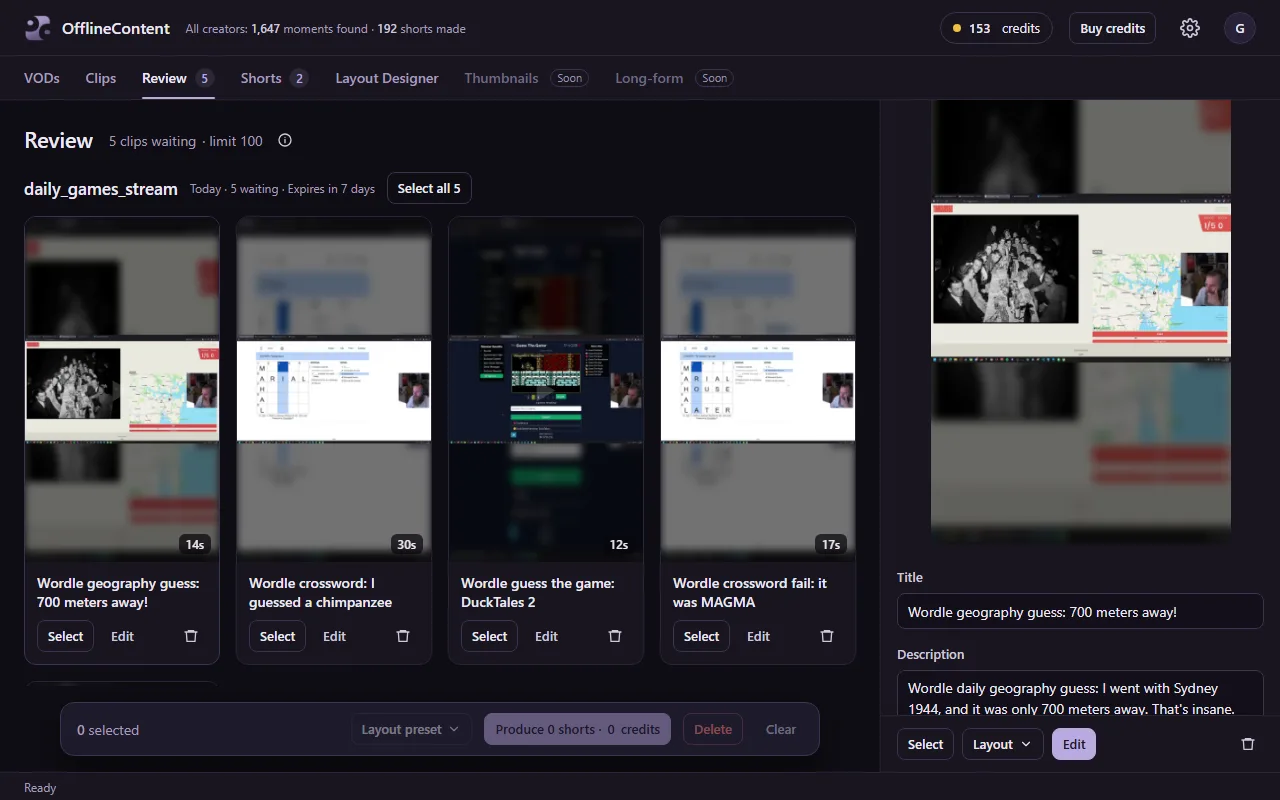
3. Review, then produce what you want
You decide which ones are good. Trim the start or end, fix a subtitle, pick a layout. Only the clips you produce cost anything, so you don't pay for the ones you skip.
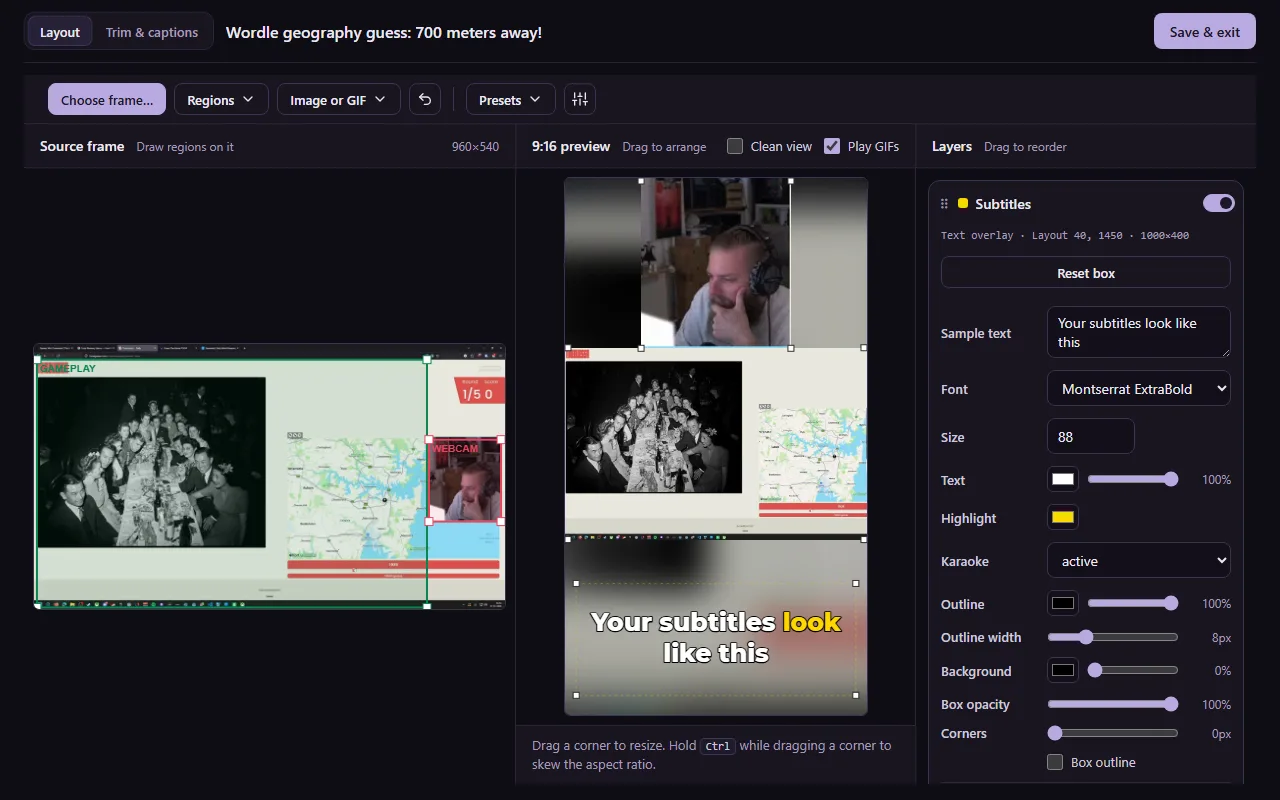
4. Vertical, subtitled, ready to post
Each short comes out at 1080x1920, up to 60 fps (same as your stream), with word-timed subtitles burned in. There's no watermark on the video, on any plan.
5. Post now or schedule
Connect TikTok and post straight from the app, or schedule it for later in the week. Nothing is posted unless you press the button. You can also download the MP4 and post it anywhere else. More on that in scheduling Twitch clips to TikTok and YouTube.
Got a VOD from this week?Connect Twitch and see which moments it finds. Takes a few minutes.
Find my shortsWhat it costs
OfflineContent charges a little per minute to analyse the stream and the rest per short you actually produce. That matters a lot for long streams.
| Step | Credits |
|---|---|
| Analyse a 4-hour VOD (1 credit per 4 minutes) | 60 |
| Produce 10 shorts (10 credits each) | 100 |
| Total | 160 credits |
On the Creator plan ($11.99 for 900 credits a month) that's about $2.13, or roughly $0.21 per short. The cheapest plan is $5.99 for 360 credits a month, and credit packs start at $6. Your first stream analysis is free.
Most AI clipping tools count every minute of source video instead. A 4-hour VOD is 240 minutes, which on a per-minute plan usually means the $29-a-month tier. If you want the numbers side by side, see OfflineContent vs OpusClip for streamers.
What would your streams cost?
OfflineContent / month$11.99Creator · 640 credits
OpusClip / month$29+Pro + extra credits (960 needed, Pro has 300) · 960 min
OfflineContent: 1 credit per 4 minutes analysed + 10 per short, cheapest plan that fits. OpusClip: 1 credit per source minute, monthly billing, prices from opus.pro/pricing checked 2 November 2026.
Tips for Twitch clips that actually do well on TikTok
- Start on the moment. The first second decides if people keep watching. Trim the build-up, keep the payoff.
- Keep it short. 20-45 seconds is plenty for most stream moments.
- Your face matters. A reaction sells the clip, so keep facecam visible in the vertical layout.
- Post consistently. One clip a day from your weekend stream beats 10 clips on Monday. Scheduling makes that easy.
- Only post what you have the rights to. Copyrighted music in the background can get a clip muted or removed.
Stop letting good clips sit in old VODs.Your first stream analysis is free, and you only pay for shorts you keep.
Get started freeQuestions
Can I use Twitch clips instead of the full VOD?
Yes. If your viewers already clipped something, you can produce a short from a Twitch clip directly, without analysing the whole VOD.
Does it post anything without asking me?
No. Nothing goes out unless you post it or schedule it yourself.
What about YouTube Shorts and Reels?
Every short is a standard vertical MP4, so you can download it and upload it to YouTube Shorts, Instagram Reels or anywhere else. YouTube can also be posted to straight from the app: see Twitch to YouTube Shorts.
Do my VODs need to be saved on Twitch?
Yes. OfflineContent works from your past broadcasts, so turn on "Store past broadcasts" in your Twitch settings. Twitch deletes them after a while (7 days for most accounts), so run it soon after the stream.
What about really long streams?
There's no length limit on Twitch VODs. See clipping long Twitch VODs for what an 8 or 12-hour stream costs.
Your next stream already has the clips in it.
Connect Twitch and get your first batch of shorts. The first analysis is free, up to 6 hours of stream.