 OfflineContent
Home / Just Chatting clips
Turn Just Chatting streams into TikToks and Shorts
In a Just Chatting stream the good moments are things you say: a story, a hot take, a reaction to something chat asked. There's no kill or win to detect. OfflineContent transcribes the whole VOD and picks moments from what's said, so it works for talk streams, not only gameplay. A 3-hour stream plus 8 shorts is 125 credits, which fits the $5.99 Lite plan.
Why talk streams are hard to clip
Most clipping tools look for something that happens on screen: a kill, a win, a loud spike in the audio. A Just Chatting stream rarely has that. The screen is you, maybe a browser, maybe a video you're reacting to, for hours. The moment worth posting is a sentence, and the only way to find it is to know what was said.
Doing that by hand means rewatching the stream, or hoping a viewer clipped the right 30 seconds. And viewer clips on Twitch are capped at 60 seconds, which is often too short for a story to land.
Five kinds of Just Chatting moment that work as shorts
Gameplay shorts live on one big event. Talk shorts live on structure: someone who wasn't there has to understand it in the first two seconds. These are the shapes that hold up on their own:
| Moment | What makes it work | Where to cut in |
|---|---|---|
| A story with a punchline | A setup you can follow cold and a pay-off at the end | On the first line that says what the story is about, not "so anyway" |
| A hot take | A clear opinion people will want to argue with in the comments | On the opinion itself; the reasons can come after |
| Answering chat | A question a stranger would also ask | On you reading the question out loud |
| A reaction | Your face and words, not the thing you're watching | Just before the moment you react to |
| A rant or confession | Energy and honesty, often your most personal clips | Where your voice changes, not where the topic starts |
All five live in what you say, and the transcript is what OfflineContent picks moments from. What it can't see is chat itself, so a moment only counts if you said it on stream.
How OfflineContent finds the moments
- It listens to the whole stream. The VOD is transcribed with word timings, from the first minute to the last.
- It picks moments from what's said. Stories with a punchline, strong opinions, funny lines, answers to a good question from chat. You can move the start and end of each one if it cuts in too early or too late.
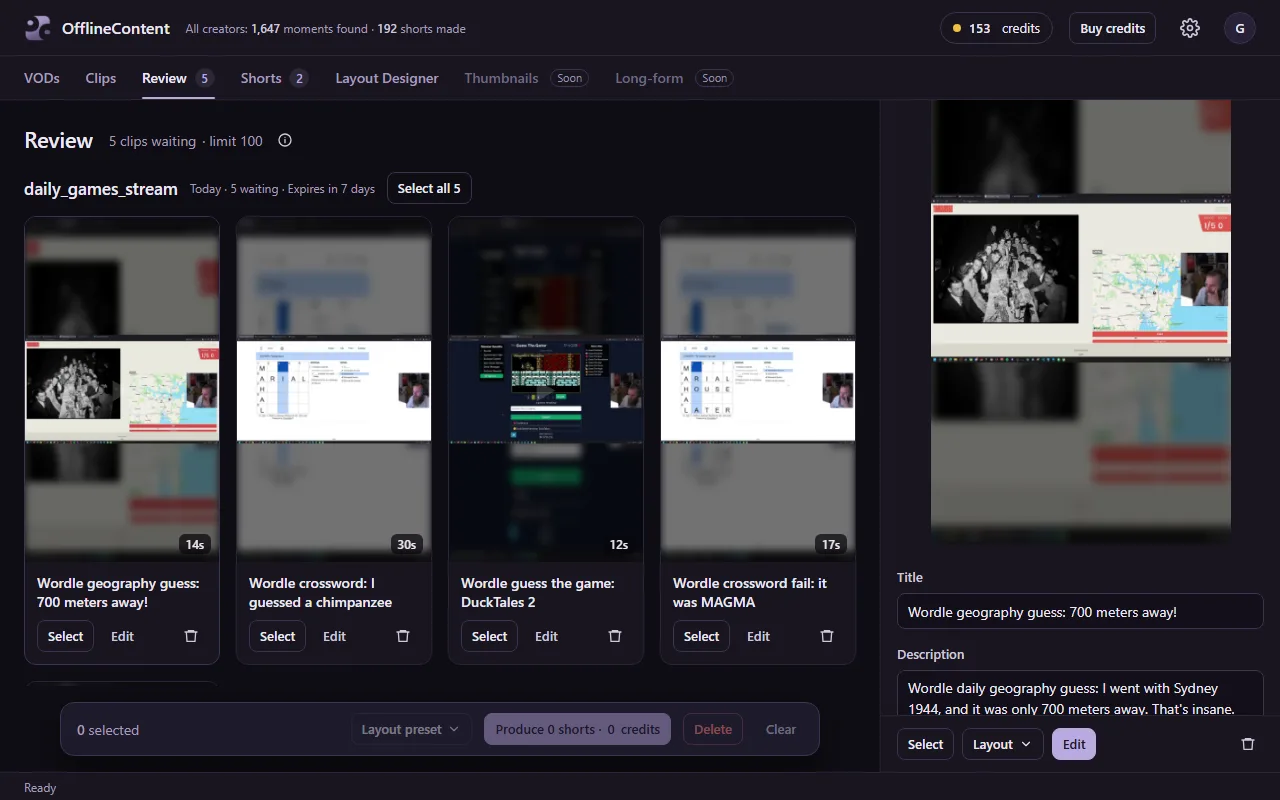
- You review the list. Each moment has a vertical preview and a title. Keep the good ones, skip the rest. You only pay for the ones you produce.
- Subtitles are built from the same transcript. Word-timed captions are burned in, and you can fix any word before you produce.
Did you talk for three hours yesterday?See which moments it finds in that VOD.
Find my shortsLayouts for a big camera
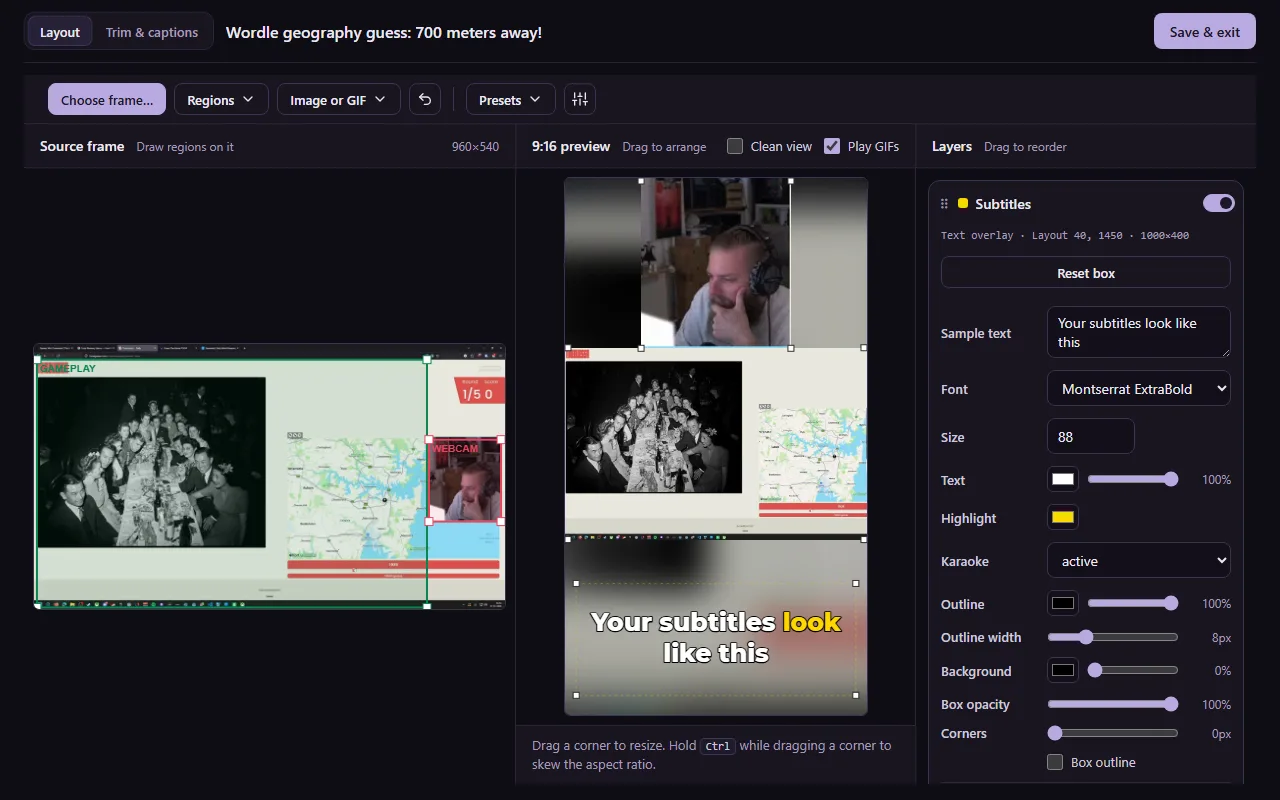
In Just Chatting your camera is usually most of the screen. Pick a built-in layout (facecam on top, facecam at the bottom, split, or full frame), or draw your own: put a box around your face and it fills the vertical short. If something you're reacting to is on screen, give it its own box above or below you. Save it as a preset and every new stream starts with it.
What it costs
Talk streams tend to run long, so the analysis is the cheap part: 1 credit per 4 minutes, so a 3-hour stream is 45 credits. Each short you produce is 10 credits, so a 3-hour stream plus 8 shorts is 125 credits. Plans are $5.99 (360 credits a month), $11.99 (900) and $24.99 (2000). Credit packs start at $6, and your first stream analysis is free. Long weekend streams? See clipping long Twitch VODs.
Tips for talking-head shorts
- Start on the line, not the setup. Trim so the first second is already the story or the take. People scroll past a slow start.
- Subtitles carry it. Most people watch muted. Fix names and slang in the captions before you produce.
- Put the question on screen. If you're answering chat, say the question out loud first, so the clip makes sense to someone who wasn't there.
- One idea per short. If a story has two good beats, make two shorts.
- Post on a schedule. One a day from your last stream beats eight at once. See scheduling clips to TikTok and YouTube.
Reaction streams: watch the audio
If you react to someone else's video, music or TV clip, that audio ends up in your short too. YouTube's Content ID can claim or block a short that carries someone else's material, and TikTok can mute or remove it. Make yourself the main thing on screen, keep the other video's audio short, and pick moments where your reaction is the point. In the layout editor you can shrink the source video to a small box and give your camera most of the frame.
Before you stream: keep the VOD
Every method needs the past broadcast to still exist. Turn on Store past broadcasts in your Twitch Creator Dashboard. Twitch keeps VODs for 7 days on most accounts, 14 days for Affiliates and 60 days for Partners, Turbo and Prime, so clip a stream in the week you streamed it. More in how to make TikToks from Twitch streams.
Questions
Does it read Twitch chat?
No. It finds moments from what you say on stream. If a good moment came from chat, it's usually because you read the message out and reacted, and that part is in the transcript.
Does it work for podcasts, IRL or reaction streams?
Anything where the good parts are spoken works the same way, as long as it's a Twitch VOD on your channel.
Can I post the same short to TikTok and YouTube?
Yes. Pick TikTok, YouTube or both, each with its own time. See Twitch VOD to TikTok, how to make TikToks from Twitch streams and Twitch to YouTube Shorts.
Does it post anything without asking me?
No. Nothing goes out unless you post it or schedule it yourself.
Your best lines are already in last night's VOD.
Connect Twitch and let it find them. The first analysis is free, up to 6 hours of stream.