 OfflineContent
Home / Twitch to YouTube Shorts
Turn Twitch streams into YouTube Shorts automatically
YouTube Shorts is one of the few places a small streamer can get found by people who don't know them yet. OfflineContent takes a Twitch VOD, finds the moments worth posting, cuts them to vertical with subtitles, and posts or schedules them straight to your YouTube channel. A 4-hour stream plus 10 shorts is 160 credits, which fits the $5.99 Lite plan.
Why Shorts are worth it for a Twitch streamer
On Twitch, new viewers mostly find you through the browse page, which is sorted by viewer count. A small stream sits at the bottom. YouTube shows Shorts to people based on what they watch, not on how big you are, so a good 30-second moment can reach people who have never heard of you.
Shorts also live on a YouTube channel, which is useful on its own: people can find your older clips through search, subscribe, and see when you post longer videos.
The manual way
- Find the moment in a 3-6 hour VOD, or hope someone clipped it.
- Download and trim it in an editor.
- Reframe to 9:16 so your face and the game both fit.
- Add subtitles, because a lot of people scroll Shorts with the sound off.
- Upload in YouTube Studio, write a title and description, set visibility.
That's 20-30 minutes per short, and step 1 is the slow part.
The automatic way with OfflineContent
1. Connect Twitch and pick a VOD
Your past broadcasts show up in the app. Pick one and press "Find shorts". Nothing to download.
2. It finds the moments
The whole stream is transcribed and scored for moments that work as a short: reactions, fails, stories, clutch plays. You get a list of them, each with a vertical preview and a title. Talk streams work too, see Just Chatting clips.
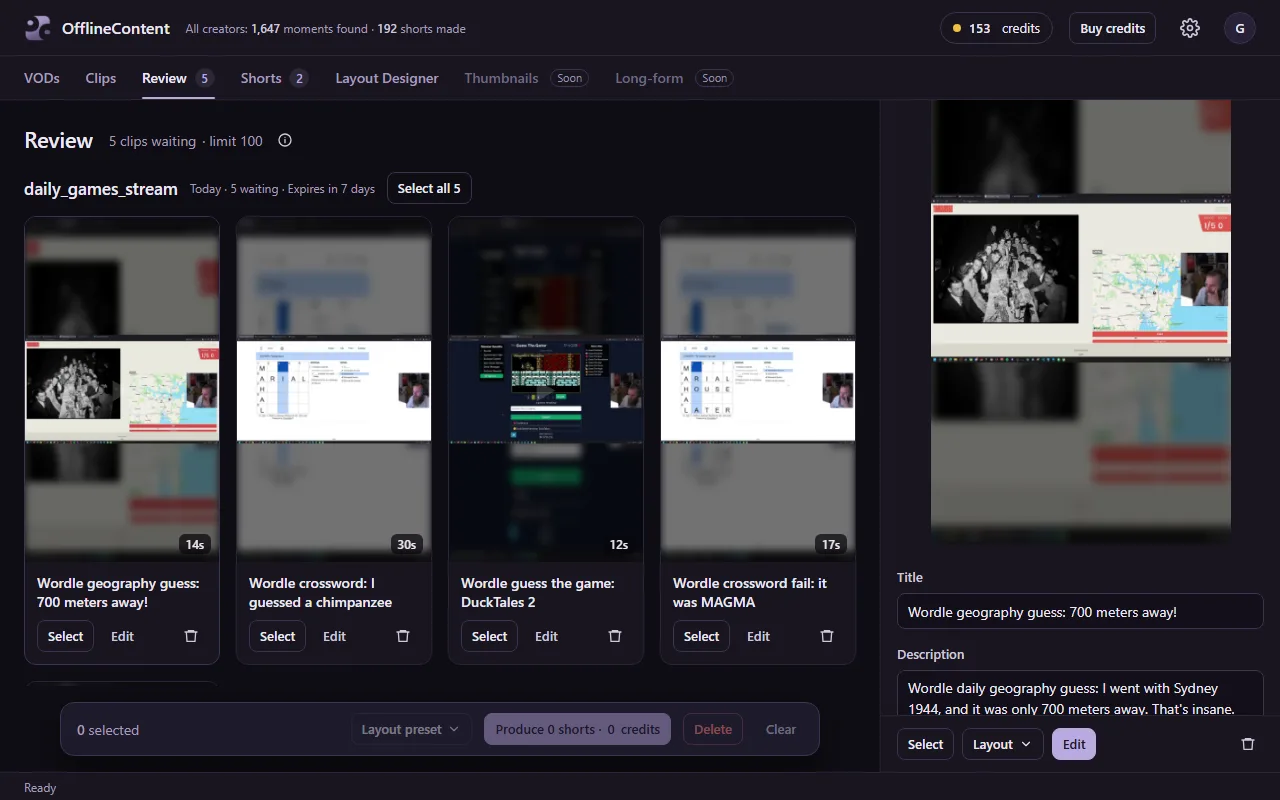
3. Review and produce
Keep the good ones, trim them, fix a subtitle, pick a layout. You only pay for the shorts you produce. Each one is 1080x1920, up to 60 fps (same as your stream), with subtitles burned in.
4. Post or schedule to YouTube
Connect your YouTube channel through Google's official login. Title and description are filled in from what's said in the clip, and you can change them. Choose public, unlisted or private, then post now or schedule it for later. See how scheduling works.
Got a VOD from this week?Connect Twitch and see which moments it finds.
Find my shortsWhat it costs
| Step | Credits |
|---|---|
| Analyse a 4-hour VOD (1 credit per 4 minutes) | 60 |
| Produce 10 shorts (10 credits each) | 100 |
| Post or schedule to YouTube | included |
| Total | 160 credits |
Plans are $5.99 (360 credits a month), $11.99 (900) and $24.99 (2000). Credit packs start at $6, and your first stream analysis is free. For streams over 6 hours, see clipping long Twitch VODs.
Tips for Shorts from streams
- Start on the moment. Cut the build-up. The first second decides if people stay.
- Keep your face in it. A reaction is what makes a gameplay clip work.
- Post on a schedule. One a day from your weekend stream beats ten at once.
- Say where you stream. A line like "live on Twitch every Saturday" in the description gives viewers somewhere to go.
- Mind the music. Copyrighted music in the background can get a Short blocked or muted.
Questions
Can I post the same short to TikTok too?
Yes. Pick YouTube, TikTok or both for each short, each with its own time. See Twitch VOD to TikTok How to make TikToks.
Does it post anything without asking me?
No. Nothing goes out unless you post it or schedule it yourself.
Can I start from a Twitch clip instead of the whole VOD?
Yes. If a viewer already clipped something, you can make a short from that clip directly.
Will there be a watermark?
Not on the video, on any plan. Posts from the app add a short "Made with OfflineContent.app" line to the description; on Creator and Pro you can turn that off.
Your last stream is a week of Shorts.
Connect Twitch and YouTube and fill your channel. The first analysis is free, up to 6 hours of stream.