 OfflineContent
Home / How to make TikToks from Twitch streams
How to make TikToks from your Twitch streams
There are three ways. Twitch's own clip tool is free and posts straight to TikTok, but a clip is at most 60 seconds and someone has to find and clip each moment. Editing the VOD yourself is free and gives you full control, but takes 20 to 30 minutes per short. An automatic tool like OfflineContent finds the moments in the whole VOD for you, from $5.99 a month. Whichever you pick, turn on Store past broadcasts first, because Twitch deletes VODs after 7 days on most accounts.
Before you start: save your VODs
Every method below needs the stream to still exist. Twitch only saves past broadcasts if Store past broadcasts is on in your Stream Settings, and that toggle is only in the Creator Dashboard on the web, not in the mobile app. Then it keeps them for a limited time:
| Account | Past broadcasts kept for |
|---|---|
| Most streamers | 7 days |
| Affiliates | 14 days |
| Partners, Turbo and Prime | 60 days |
Source: Twitch Help, On-Demand Content on Twitch, checked 8 November 2026. If you stream in 2K or vertical, that higher-quality version expires after 7 days on every account.
So the realistic plan is: stream, then make your shorts within the week.
Way 1: Twitch's own clip tool (free, quick, short)
- Clip the moment. Hit Clip during the stream or while watching the VOD, and drag the slider to pick up to 60 seconds.
- Check the portrait crop. Twitch saves every clip in landscape and portrait, and suggests a crop that keeps your camera and gameplay in frame. Fix it in the Clip Editor if it's off. Portrait editing isn't on the mobile app yet, so do this on a computer.
- Share to TikTok. From your Clips Manager, Share sends it straight to TikTok (or YouTube Shorts, Instagram, Snapchat). Twitch fills in a title and description you can change.
Good for: a moment you already know was good. The catch: 60 seconds max, and someone has to clip the moment. On a 4-hour stream, the moments nobody clipped are lost.
Source: Twitch Help, How to Create, Edit, and Share Clips, checked 8 November 2026.
Way 2: Edit the VOD yourself (free, slow, full control)
- Download the VOD. Creator Dashboard, Content, Video Producer, then the three dots next to the stream and Download. Long streams can take a while to start. If parts were muted for music, the download stays muted.
- Find the moments. Scrub through the stream, or jump to stream markers if you added them live. This is the slow part: a 4-hour stream is a lot of scrubbing.
- Cut and crop to vertical. In a free editor (CapCut and DaVinci Resolve both work), set the project to 1080x1920 (9:16). Stack your facecam on top and the gameplay below, or go full camera for talking.
- Add subtitles. Most people scroll muted. Auto-captions in the editor, then fix names and slang by hand.
- Export and post. MP4, 1080x1920, same frame rate as your stream. Upload in the TikTok app or on the web.
Good for: a few shorts a week where you want every frame your way. The catch: 20 to 30 minutes per short once you're fast, plus the time to find the moment.
Way 3: Let a tool find the moments (fast, paid)
This is what OfflineContent does (more on turning a Twitch VOD into TikToks). Connect Twitch, pick a past broadcast, and it transcribes the whole stream and lists the moments that work as a short: stories, reactions, fails, clutch plays. Each one has a vertical preview and a title.
- Pick the VOD. Any Twitch past broadcast on your channel, with no length limit.
- Review the list. Keep the good moments, skip the rest. Move the start or end if it cuts in too early or late.
- Set your layout once. Draw boxes for camera and gameplay, save it as a preset, and every stream after that uses it.
- Produce and post. Each short comes out 1080x1920 with word-timed subtitles burned in. Post to TikTok and YouTube now, or schedule one a day. Nothing goes out without you.
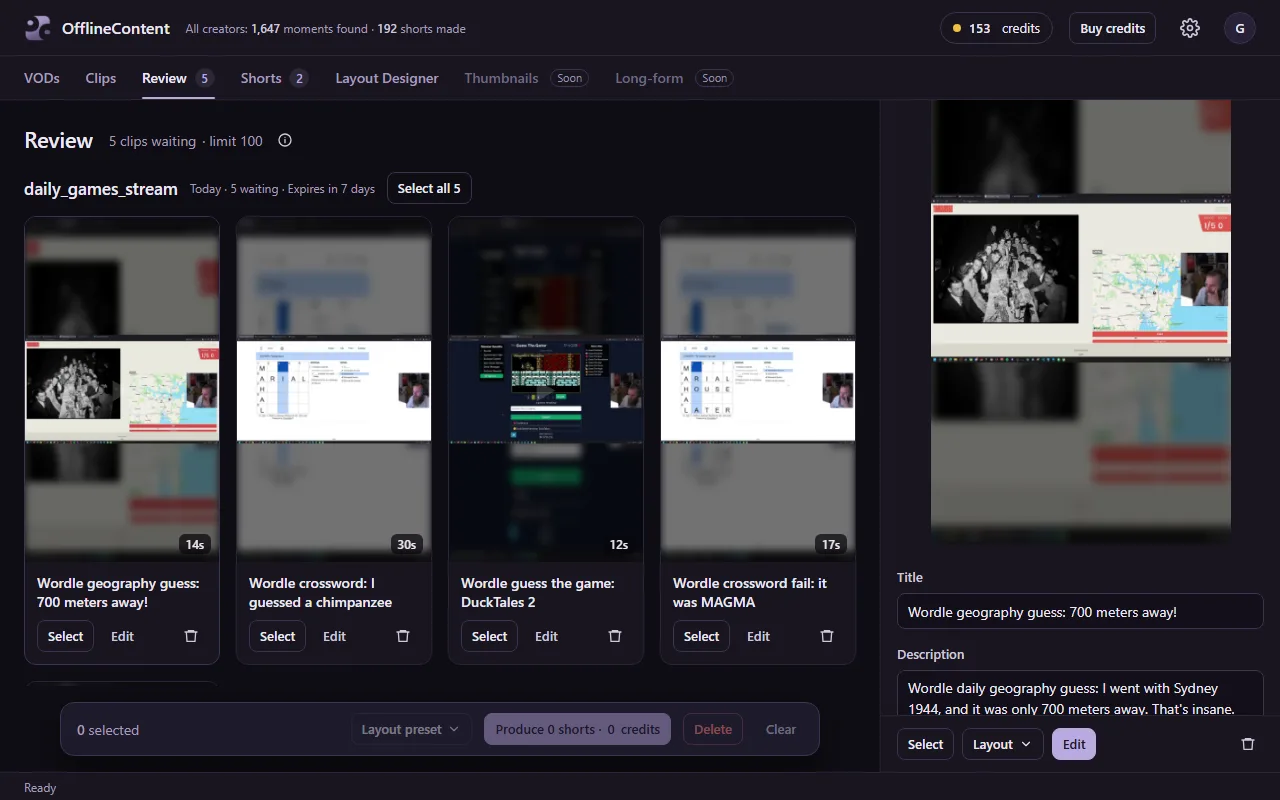
Cost: 1 credit per 4 minutes of stream to analyse (about 15 an hour) and 10 credits per short you keep. A 4-hour stream with 10 shorts is 160 credits, inside the $5.99 Lite plan (360 credits). Your first stream is analysed free, up to 6 hours. Other tools that do this, with prices: the best AI clipping tools for streamers.
Got a VOD from this week?See which moments it finds before it expires.
Find my shortsWhich way should you use?
| Twitch clip tool | Edit it yourself | OfflineContent | |
|---|---|---|---|
| Money | Free | Free | From $5.99/month |
| Your time per short | A minute, if the moment was clipped | 20 to 30 minutes, plus finding it | Reviewing a list |
| Finds moments for you | No | No | Yes, from the whole VOD |
| Max length | 60 seconds | Anything | You set start and end |
| Posts to TikTok | Yes | You upload | Yes, or schedule |
Many streamers mix them: Twitch clips for the one moment chat went wild about, and an automatic tool for everything else in the VOD.
What makes a stream moment work on TikTok
- The first second is the moment. Cut the setup. Start on the reaction or the line.
- It makes sense to a stranger. Nobody on TikTok knows your inside jokes. If it needs context, put one line of text on screen.
- Subtitles on. Most people watch muted.
- Your face in frame. People follow a person, not a game. Keep the camera big.
- Watch the music. Copyrighted music in the background can get a short muted.
- Post often, not all at once. One a day from last week's stream beats ten on Sunday. See scheduling a week of shorts.
Questions
Can I make TikToks from Twitch streams for free?
Yes: Twitch's clip tool and a free editor like CapCut cost nothing. You pay in time instead. OfflineContent's first analysis is also free, up to 6 hours of stream.
How long should a Twitch clip on TikTok be?
As long as the moment, and no longer. Most good stream moments land between 15 and 60 seconds.
Can I use a stream that's already deleted from Twitch?
No. Once a past broadcast expires, Twitch can't recover it. Download it first, or make your shorts within the storage window.
Can I post the same short to YouTube Shorts?
Yes, the same vertical video works on both. See Twitch to YouTube Shorts.
Is the automatic way good for Just Chatting?
It's where it helps most, because talk streams have no kill feed to clip from. See Just Chatting clips.
Last week's stream still has shorts in it.
Connect Twitch and let it find them before the VOD expires. The first analysis is free, up to 6 hours.