 OfflineContent
Stream delay on and off, while live
OBS can't change its delay mid-stream. OC Delay sits between OBS and Twitch, YouTube, Kick or TikTok and does it with one switch.
Free, no account. Version 0.1.21 · 34 MB · Windows 10 and 11.
Downloading. Next: the Windows warning, then 3 setup steps.
Try the switch
The dot is you on the map. With the delay on, your viewers (and anyone watching to find you) see where you were, not where you are.
Delay off, viewers see you live
The real app does the same from a dock in OBS, a Stream Deck button or the dashboard, 5 seconds to 10 minutes.
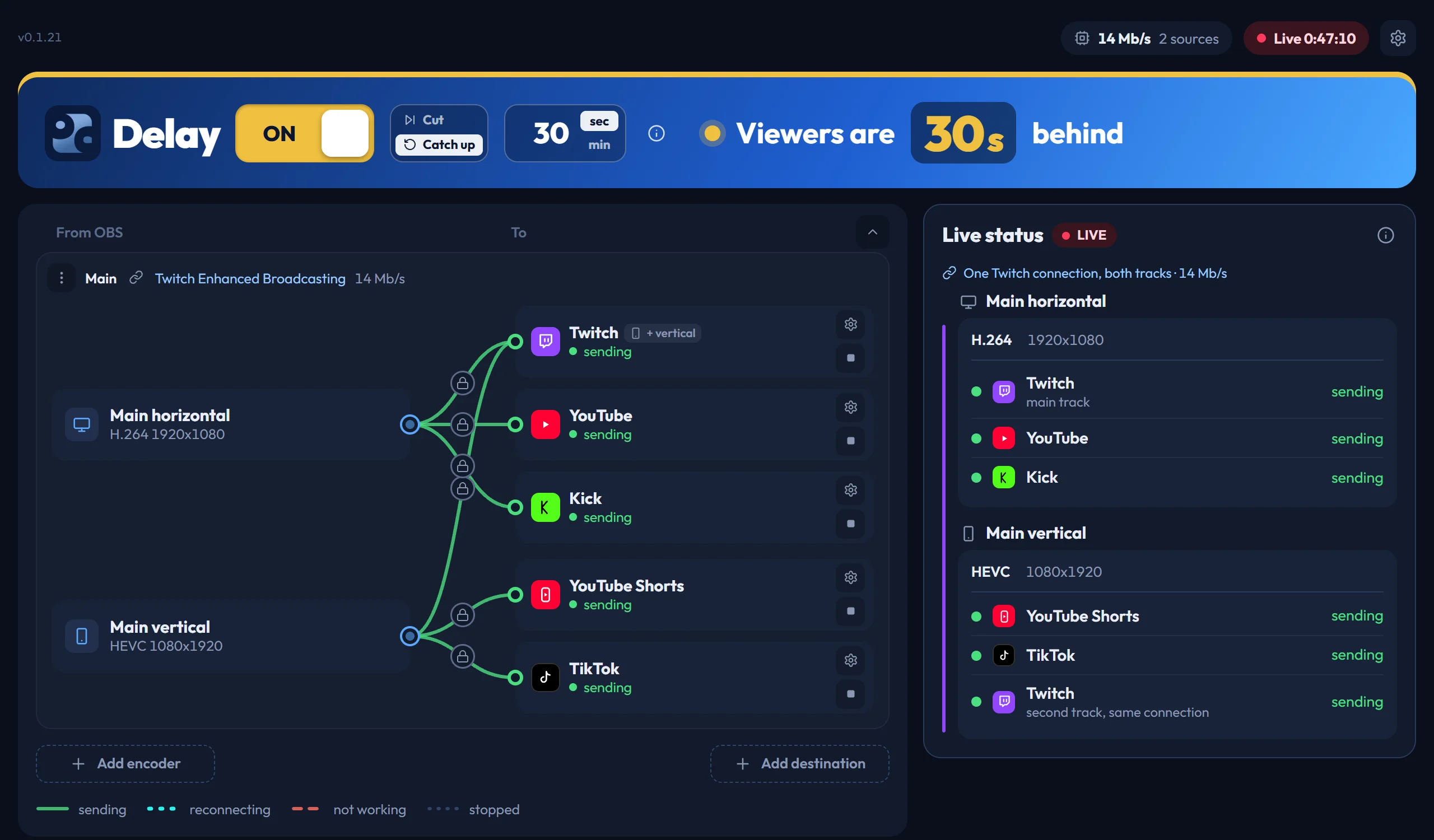
The real delay screen, horizontal and vertical. Viewers get this while the delay builds, not a frozen frame or a dropped stream.
A clean switch for viewers

Building: the delay screen shows until viewers are 30 s behind.

On: viewers are 30 s behind you.

Off with Catch up: viewers see the rest, then jump to live. Or Cut straight to live.
One OBS, every platform
Keep Twitch Enhanced Broadcasting. OC Delay passes all of it to Twitch and sends single tracks to the rest, so your PC encodes nothing extra. One switch delays every platform at once.
The delay hits all of them
Turn it on and Twitch, YouTube, Kick, Shorts and TikTok are all behind by the same seconds. Nobody can open another platform to see you live.
Start and stop each one
Every platform has its own Start and Stop, also while you're live.
Vertical without a second encoder
Twitch's own vertical track goes to TikTok and Shorts as it is. Needs a vertical canvas in OBS.
Your stream stays as it is
OC Delay passes on exactly what OBS sends. No re-encoding, no quality loss.
If something fails, you stay live
Every part falls back to a plain pass-through. A problem gets logged, it doesn't end your stream.
Record in the same place
Add Record: MP4 or MKV, with or without the delay. Not better than OBS, just one dashboard.
Guides: how to multistream from OBS, Enhanced Broadcasting vertical to TikTok and Shorts, OC Delay vs InstantDelay.
Control it your way
The same switch in three places. Use whichever is closest to your hand mid-game.
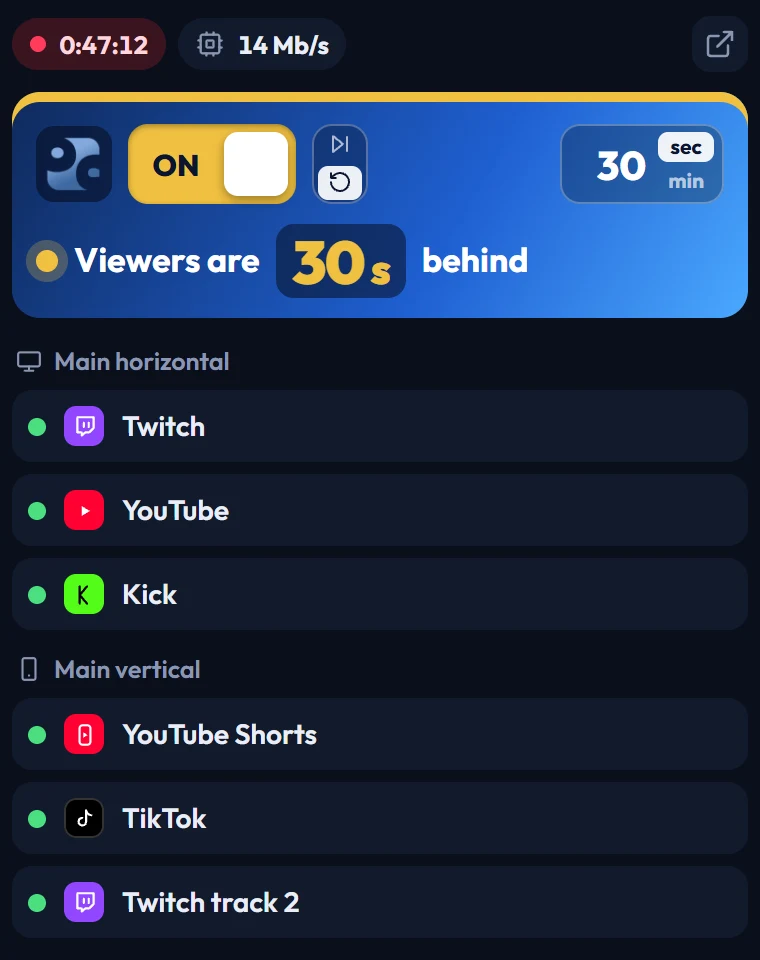
A dock inside OBS
Switch, length and every platform's status, right next to your scenes.
Stream Deck buttons
On / off, Skip to live, Catch up and a length button. Copy the links from the dashboard into Stream Deck's Website action.
Starts with OBS
Add the OC Delay script once in OBS (Tools, Scripts). OC Delay then opens when OBS opens and closes when OBS closes.
Set it up in 3 steps
You change one thing in OBS: the server. Your stream key stays the same.
Start OC Delay
Run the file you downloaded. The dashboard opens. Pick your platform there.
OCDelay-0.1.21.exe34 MB · Windows 10 and 11Change the server in OBS
Settings > Stream. Twitch: keep the Twitch service, tick Use custom server and paste the address. You stay logged in and Enhanced Broadcasting keeps working.
ServiceTwitch✓Use custom serverServerrtmp://127.0.0.1/mainStream key••••••••••••YouTube, Kick, others: pick service Custom and paste the server the dashboard shows. Keep your stream key.
Add the dock
Copy the Dock URL from the dashboard. In OBS: Docks > Custom Browser Docks, name it "OC Delay" and paste. Flip the Delay switch when you need it.
Dock nameOC DelayURLfile:///C:/Users/.../OCDelay/dock.html
Want to stream without OC Delay? Put your old server back in OBS. That's it.
"Windows protected your PC"
You'll probably see this the first time you run it. Click More info, then Run anyway.
Windows shows that screen for any app that isn't signed with a paid certificate. OC Delay is free and we haven't bought one, so Windows doesn't know us yet. It's not a virus warning. Updates the app installs itself don't show it again. If you'd rather check first, ask in our Discord.
Can I trust it with my stream?
Does my stream go through your servers?
No. OC Delay runs on your own PC and sends your stream straight to Twitch, YouTube, Kick or TikTok. We never see it.
Do you see my stream key?
No. Your keys stay on your PC, encrypted. OC Delay doesn't send keys or usage data anywhere.
Does it update itself?
It tells you when a new version is out and installs it when you press Update, never while you're live. Once a day OC Delay fetches one small file from offlinecontent.app to see if a newer version exists. The request carries nothing about you (the server sees your IP, like any web page). Cog > untick Check daily to stop it.
Can't OBS do this itself?
OBS has a stream delay, but you can only change it while you're offline. OC Delay turns its delay on or off while you're live.
Does Twitch Enhanced Broadcasting still work?
Yes. You keep the Twitch service in OBS and only tick Use custom server, so Enhanced Broadcasting stays on and every quality is delayed together.
What if OC Delay crashes mid-stream?
It's built so a failing part falls back to a plain pass-through and keeps you live. If the app itself closes, OBS loses its connection like it would with any server, and you can put your old server back to go live without it.
Why is it free?
It's made by OfflineContent, which turns your streams into shorts and clips. OC Delay is how we say hi to streamers. It stays free, there's no paid version.
Mac or Linux?
Not right now. OC Delay is Windows and OBS only.
Who made this?
OC Delay is free from OfflineContent. We turn your Twitch streams into vertical clips with subtitles for TikTok and YouTube Shorts, so the good moments don't stay buried in old VODs. Your first stream is analysed free, up to 6 hours.
Get OC Delay. It's free.
Windows, works with OBS. Setup takes a few minutes.