 OfflineContent
Home / Schedule Twitch clips
Schedule Twitch clips to TikTok and YouTube Shorts
Posting every day works. Doing it by hand with a day job doesn't. OfflineContent turns your Twitch stream into vertical, subtitled shorts and lets you schedule each one to TikTok and YouTube for a set time, so one weekend stream becomes a week of posts that go out while you're at work. It uses the official TikTok and YouTube connections, and nothing goes out unless you set it up.
Why schedule instead of posting everything at once
Short-form platforms reward showing up often. Ten clips dropped on Monday night compete with each other. The same ten clips posted one a day give you ten separate chances to get picked up, and your profile looks alive all week, not just the day after you streamed.
The catch is that "post one a day" turns into "remember to post one a day", and that's the first thing to go when work gets busy. Scheduling moves that to the one evening you do have time.
How it works
- Start from a stream or a clip. Connect Twitch and pick a past broadcast, and OfflineContent finds the moments for you. Or start from a Twitch clip your viewers already made.
- Review and produce. Pick the shorts you want, trim them, fix a subtitle. Each one comes out at 1080x1920, up to 60 fps (same as your stream), with subtitles burned in and no watermark on the video.
- Title and description are filled in. They're written from what's said in the clip. Change anything you don't like.
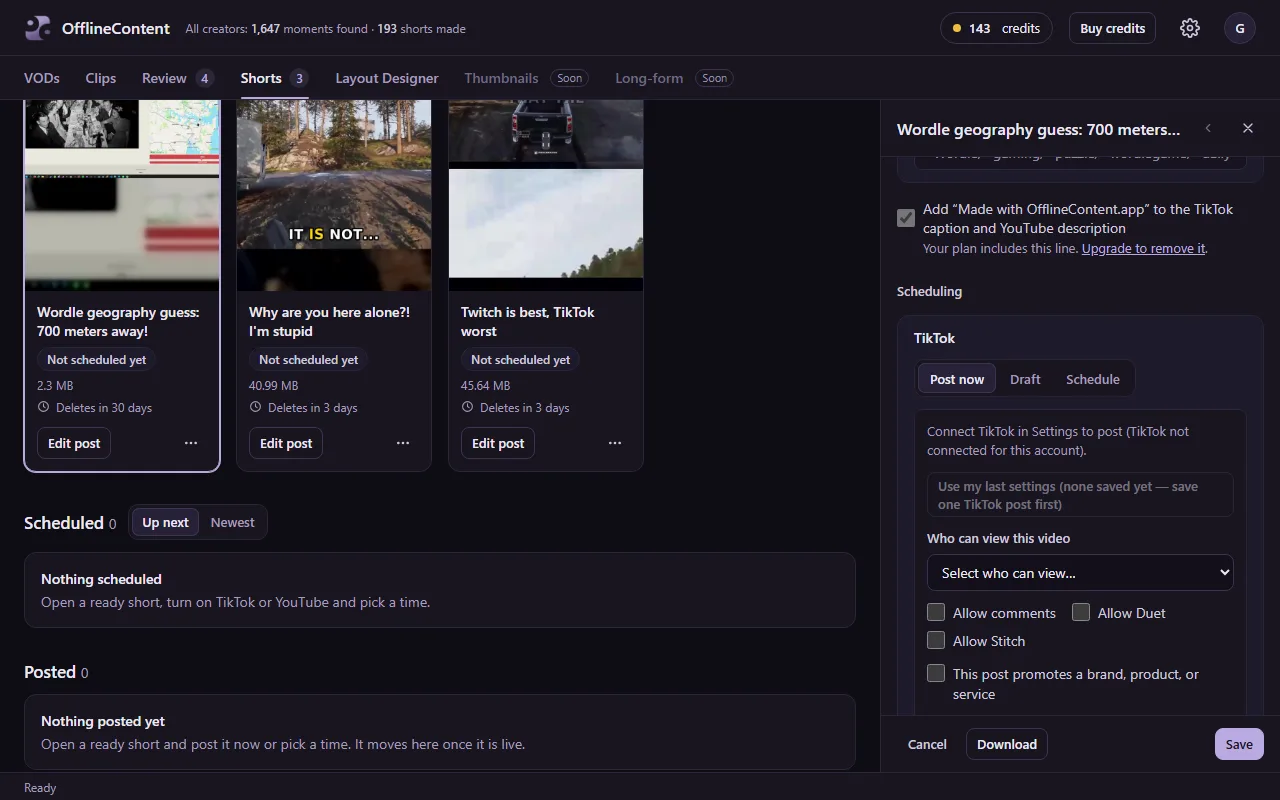
- Choose per platform. For each short, pick TikTok, YouTube or both, and for each one choose: post now, schedule for a date and time, or keep it as a draft.
- It posts on time. At the time you picked, the short goes out through your connected account. You can see what's queued and cancel anything before it goes.
Have a stream from this week?Turn it into a queue of shorts in one sitting.
Find my shortsA simple weekly routine
| When | What you do |
|---|---|
| Saturday | Stream like normal. |
| Sunday, 20 minutes | Pick the VOD, review the moments it found, produce 7 shorts. |
| Sunday, 5 more minutes | Schedule one a day, Monday to Sunday, to TikTok and YouTube. |
| Monday to Sunday | Nothing. They post on their own. |
A 4-hour stream plus 7 shorts is 130 credits (60 to analyse, 70 to produce), which fits the $5.99 Lite plan with room to spare. More on the cost of turning a stream into shorts in Turn Twitch VODs into TikToks.
What you stay in control of
- Nothing posts without you. A short only goes out if you post it or schedule it. Drafts stay drafts.
- Official connections. TikTok and YouTube are connected through their own login and APIs. We never ask for your password, and you can disconnect any time.
- Your files are yours. You can always download the MP4 and post it somewhere else, like Instagram Reels.
Tips for scheduled shorts
- Pick a time and stick to it. Same time every day is easier for you and for your followers.
- Lead with your best clip. Put the strongest one first in the week, when the stream is freshest.
- Mention the stream. A line like "live every Saturday" in the description turns a viewer into someone who knows when to find you.
- Long stream? Spread it out more. A 10-hour stream can fill two weeks. See clipping long Twitch VODs.
Questions
Can I schedule the same short to TikTok and YouTube at different times?
Yes. You choose the mode and time per platform for each short.
Does it post to Instagram?
Not directly yet. Download the MP4 and upload it to Reels yourself.
Can I change my mind after scheduling?
Yes. Cancel or change a scheduled post any time before it goes out.
Does it cost extra to schedule?
No. You pay credits to analyse the stream and to produce shorts. Posting and scheduling are included.
Stream once, post all week.
Connect Twitch, pick a VOD and fill your queue. The first analysis is free, up to 6 hours of stream.