 OfflineContent
Home / StreamLadder alternative
The StreamLadder alternative for streamers who want the clips found for them
StreamLadder started as a free editor for turning a single Twitch clip into a vertical TikTok, and that editor is still its strength. Its AI clipping, ClipGPT, is on the Creator plan. OfflineContent works the other way round: you give it a whole Twitch VOD, it finds the moments, and you keep the ones you like. That's on every plan, from $5.99 a month, and your first stream is analysed free.
Quick verdict
Pick StreamLadder if you already have the clips (your own or your viewers') and just want them vertical, for free; you stream on Kick or YouTube as well as Twitch; you want to post to Instagram Reels and Facebook too; or you want a mobile app.
Pick OfflineContent if you don't have time to find the moments yourself, you want AI clipping without paying for a higher tier, your streams are long, or a lot of your good moments are you talking rather than big plays.
OfflineContent vs StreamLadder at a glance
| OfflineContent | StreamLadder | |
|---|---|---|
| Where you start | A full Twitch VOD | A clip you pick, or a VOD for ClipGPT (Creator plan) |
| AI finds the moments | Every plan | ClipGPT, Creator plan |
| Cheapest paid plan | $5.99/month (Lite) | Starter, priced in your local currency |
| Plan with AI clipping | $5.99/month (Lite) | Creator (DKK 187/month when checked from Denmark) |
| Free to try | First stream analysed free, up to 6 hours | Free clip editor, converter and downloader; 7-day trial of paid plans incl. ClipGPT |
| Stream sources | Twitch | Twitch, Kick, YouTube |
| Clips per stream | You pick from what it finds and pay only for the ones you keep | Up to 30 per stream with ClipGPT |
| Post and schedule to | TikTok, YouTube | TikTok, YouTube Shorts, Instagram Reels, Facebook (from Starter) |
| Watermark | None on the video, any plan | None on basic editing; Starter editor features used on the free plan add one |
| Mobile app | No | iOS and Android |
StreamLadder facts from the homepage and FAQ on streamladder.com and its plans page, checked 7 November 2026. StreamLadder shows prices in your local currency, so check them in their app before you buy.
Clip editor vs VOD-first
StreamLadder's free editor is good at one job: take a clip, put the facecam and gameplay in a vertical layout, export. If a viewer already clipped the moment, that's quick. The catch is that someone has to find the moment first, and for a 4-hour stream that's the slow part.
OfflineContent starts from the whole VOD. It transcribes the stream from start to finish, picks the moments that work as a short (stories, reactions, fails, clutch plays), and shows you a list with a vertical preview and a title for each. You keep the good ones, adjust the start and end if needed, and produce them. More on how that works in Twitch VOD to TikTok.
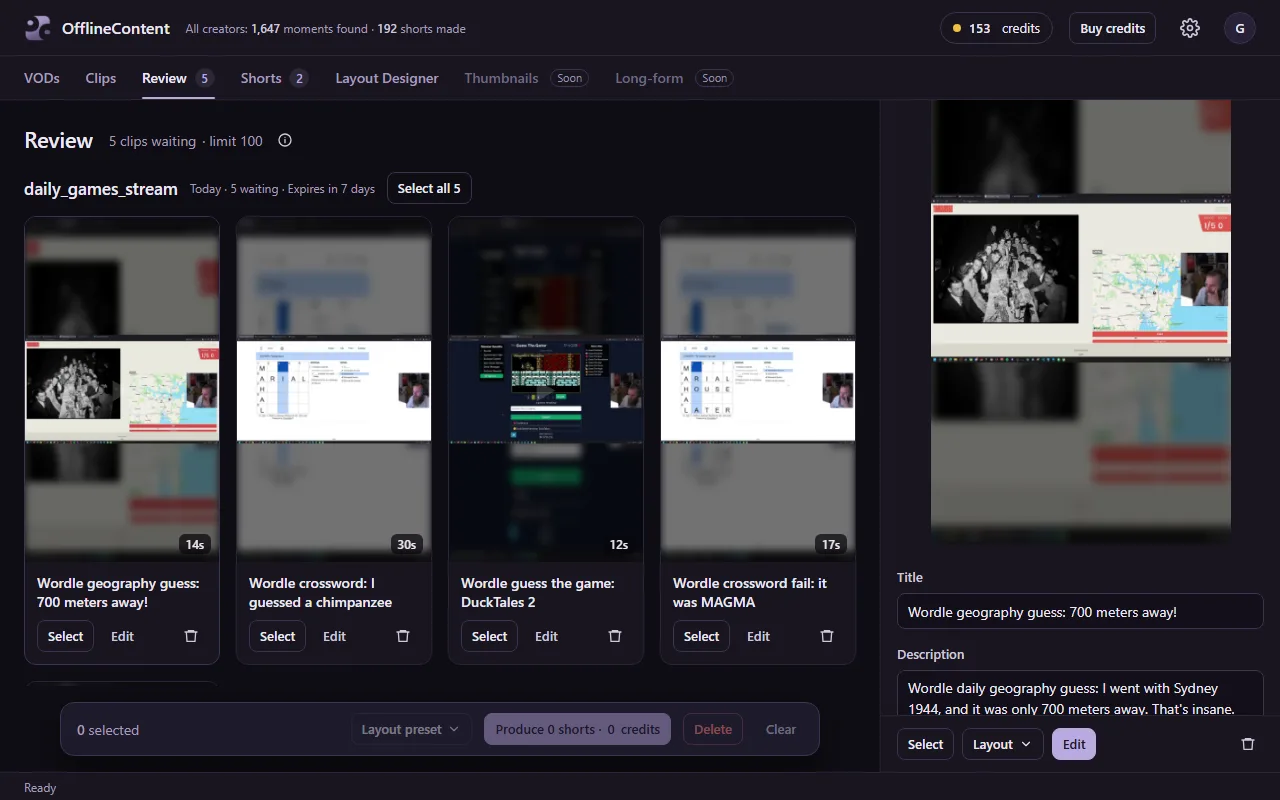
See what it finds in your last stream.The first analysis is free, so you can compare it with your own picks.
Find my shortsPrice
StreamLadder's AI clipping is on the Creator plan, which was DKK 187 a month when we checked from Denmark (they give two months free on yearly). OfflineContent charges credits: 1 credit per 4 minutes of stream to analyse it (about 15 an hour), and 10 credits per short you produce. Moments you skip cost nothing.
| Streamer | Credits a month | OfflineContent plan |
|---|---|---|
| 1 stream a month, 4 h, 10 shorts | 160 | $5.99 (Lite, 360 credits) |
| 1 stream a week, 4 h, 10 shorts each | 640 | $11.99 (Creator, 900 credits) |
| Daily streamer, 2 h, 3 shorts each | about 1,800 | $24.99 (Pro, 2000 credits) |
If you only ever need single clips made vertical, StreamLadder's free editor costs nothing and OfflineContent isn't the right tool. If you want the moments found for you, compare the plan that includes AI clipping on each side.
Layouts and subtitles
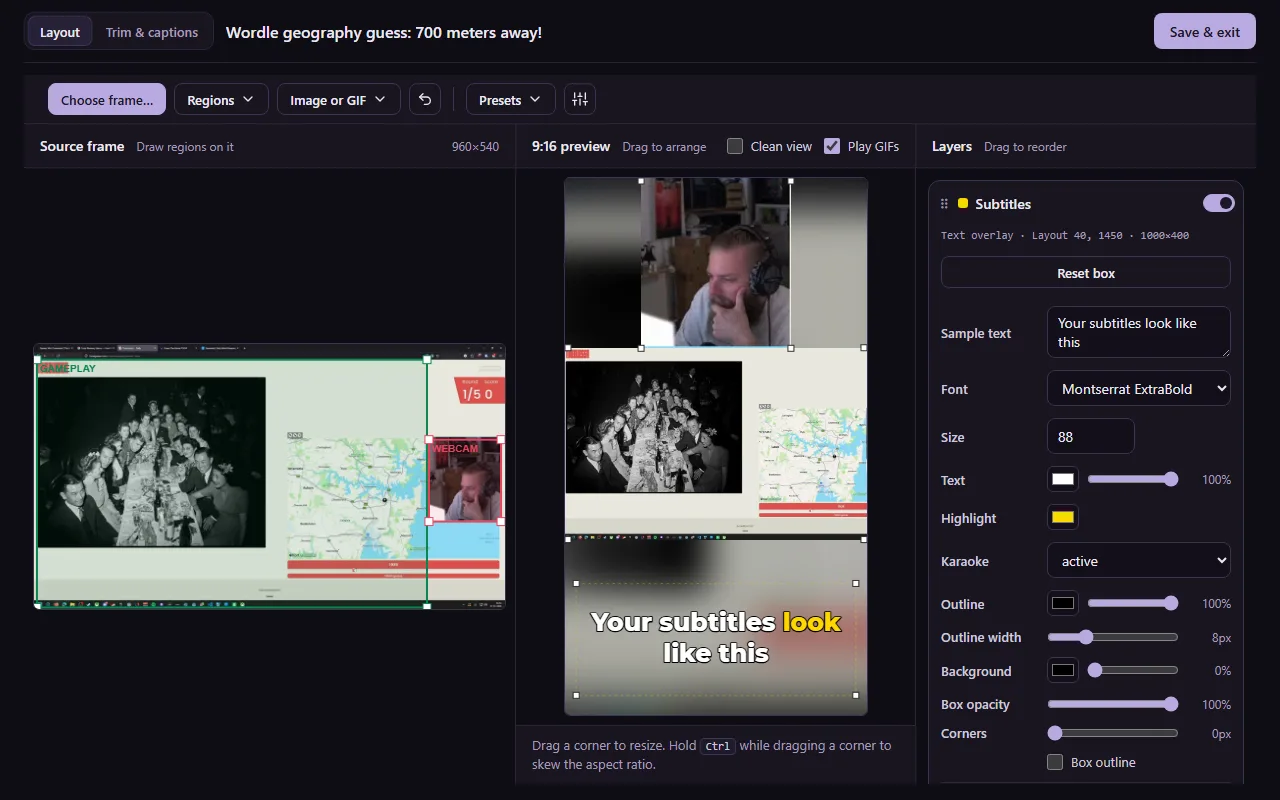
Both tools put your facecam and gameplay in a vertical layout and burn in captions. In OfflineContent you pick a built-in layout or draw your own boxes on the stream frame, save it as a preset, and every new stream starts with it. Subtitles are word-timed from the transcript, and you can fix any word before you produce.
Posting and scheduling
StreamLadder's Content Publisher posts and schedules to TikTok, YouTube Shorts, Instagram Reels and Facebook, from the Starter plan. OfflineContent posts and schedules to TikTok and YouTube through their official connections on every plan, and you download the MP4 for anything else. Nothing is posted without you. See how scheduling works.
Other StreamLadder alternatives
- Eklipse picks clips from gameplay events and chat, and supports more stream platforms. OfflineContent vs Eklipse.
- OpusClip is the best-known AI clipper, priced per minute of video. OfflineContent vs OpusClip.
- All six side by side: the best AI clipping tools for streamers.
Questions
Is there a free StreamLadder alternative?
OfflineContent analyses your first stream free, up to 6 hours, with no watermark on the video. After that, plans start at $5.99 a month. StreamLadder's own free plan is a manual clip editor.
Does OfflineContent work with Kick or YouTube streams?
Not yet. It works from Twitch VODs. If you stream on Kick or YouTube, StreamLadder covers those today.
Can I use my own Twitch clips?
OfflineContent is built around full VODs: it finds the moments for you. If you already have a clip you want made vertical, StreamLadder's free editor is the quicker route.
Does it post anything without asking me?
No. Nothing goes out unless you post it or schedule it yourself.
Stop hunting for the clip.
Connect Twitch and let it find the moments in your last stream. The first analysis is free, up to 6 hours.